HashiCorp Vault at Chorus One
Who is this for? This document is written for anyone who works with infrastructure at Chorus One — whether you have never touched Vault before, or you are an engineer trying to onboard a new service. No prior Vault knowledge is assumed.
Table of Contents
- What is Vault and Why Do We Use It?
- Vault Cluster Architecture
- Initialization and Unseal
- What Lives in Vault
- Authentication Methods
- How Secrets Reach Services
- Policy System
- SSH Certificate Authority
- AWS Secrets Engine
- Registering a New Service
- Operational Procedures
- Real-World Example: KAPI Vault Auth Failure
- Troubleshooting
1. What is Vault and Why Do We Use It?
The Problem
Every service we run needs secrets to function: database passwords, API keys, validator signing keys, IPFS tokens, and so on. The naive approach is to store these in config files, environment files, or code repositories. This creates serious risks:
- Secrets leak into git history or logs.
- There is no audit trail (who read what, when).
- Rotating a leaked secret means manually updating every service that uses it.
- A single compromised server exposes all its hardcoded secrets.
The Solution: A Centralised Secret Store
HashiCorp Vault is a purpose-built secret management system. Think of it like a physical bank vault: you do not leave cash lying around your office — you put it in the vault and only authorised people with the right credentials can access the right compartments.
┌─────────────────────────────────────────────────────────┐
│                   WITHOUT VAULT                         │
│                                                         │
│  app1/config.env ──► DB_PASSWORD=abc123                 │
│  app2/docker-compose.yml ──► API_KEY=secret456          │
│  app3/k8s-secret.yaml ──► TOKEN=xyz789                  │
│                                                         │
│  Problems: secrets in git, no audit, hard to rotate     │
└─────────────────────────────────────────────────────────┘

┌─────────────────────────────────────────────────────────┐
│                    WITH VAULT                           │
│                                                         │
│  app1 ──► authenticates ──► Vault ──► gets DB_PASSWORD  │
│  app2 ──► authenticates ──► Vault ──► gets API_KEY      │
│  app3 ──► authenticates ──► Vault ──► gets TOKEN        │
│                                                         │
│  Benefits: central audit log, fine-grained access,      │
│  easy rotation, no secrets in git                       │
└─────────────────────────────────────────────────────────┘
What Vault Does for Us
| Capability | Description |
|---|---|
| Secret Storage | Encrypted KV store for passwords, API keys, certs |
| Dynamic Secrets | Generates short-lived AWS credentials on demand |
| Authentication | Kubernetes service accounts, AppRole, OIDC (Google/Okta) |
| Fine-grained Policies | Service A can only read its own secrets |
| Audit Logging | Every secret read/write is logged with who, when, what |
| SSH CA | Issues short-lived SSH certificates instead of static keys |
| Encryption-as-a-Service | Transit engine encrypts data without exposing keys |
2. Vault Cluster Architecture
High-Level Overview
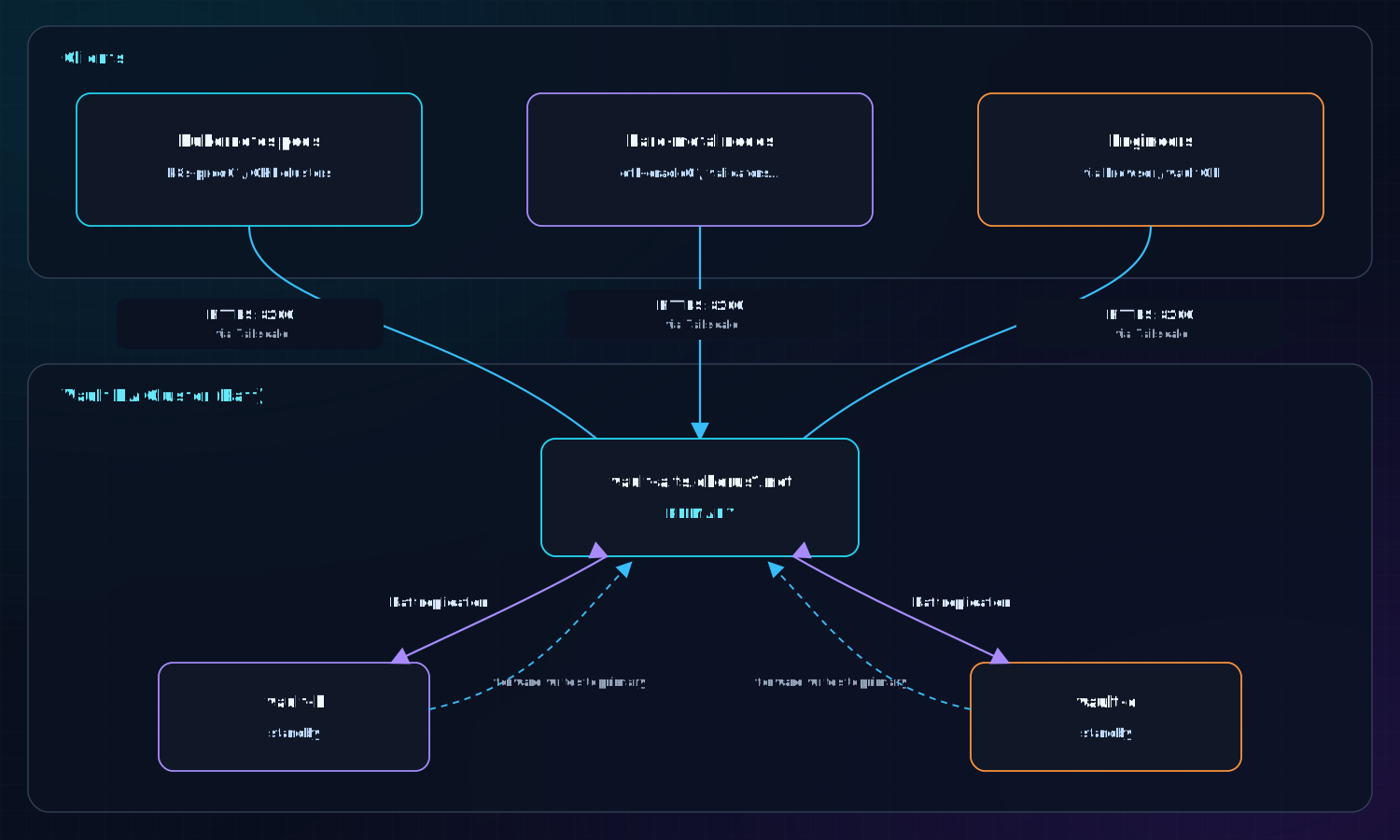
Key Design Decisions
Raft Storage Backend All three nodes form a Raft consensus cluster. Data is replicated across all nodes. If the primary goes down, one of the standbys is automatically promoted. No external database is needed.
Tailscale-Only Access
Vault's API port (8200) and cluster port (8201) are firewalled to Tailscale CIDR 100.64.0.0/10 only. Vault is not accessible from the public internet. Any service that needs Vault must be on the Tailscale network.
TLS Everywhere All communication uses TLS certificates issued by Let's Encrypt for each node's hostname.
Primary endpoint: https://vault-a.ts.chorus1.net:8200
3. Initialization and Unseal
The Seal: Vault's Physical Lock
When a Vault server starts (or restarts after a crash), it boots in a sealed state. A sealed Vault is completely locked — it cannot decrypt any stored data or serve any requests. This is by design: even if an attacker copies the storage files, they cannot read anything without the master encryption key.
┌────────────────────────────────────────────────────────┐
│                   VAULT STATES                         │
│                                                        │
│  SEALED ──► (unseal with key shares) ──► UNSEALED      │
│                                                        │
│  Sealed:   Vault is running but locked.                │
│            No secrets can be read or written.          │
│            Happens on: first start, server restart,    │
│            manual seal (security emergency)            │
│                                                        │
│  Unsealed: Vault is fully operational.                 │
│            Normal state during daily operations.       │
└────────────────────────────────────────────────────────┘
Shamir's Secret Sharing: Requiring Multiple People
Vault uses Shamir's Secret Sharing to split the master encryption key into multiple shares. Our configuration:
- 5 key shares — one for each named operator
- Threshold: 2 — any 2 shares are sufficient to unseal
This means no single person can unseal Vault alone. An attacker would need to compromise at least 2 key holders simultaneously.
┌─────────────────────────────────────────────────────────────┐
│              SHAMIR'S SECRET SHARING                        │
│                                                             │
│  Master Key ──► split into 5 shares                         │
│                                                             │
│  Share 1 ──► encrypted with joebowman's PGP key             │
│  Share 2 ──► encrypted with reisen's PGP key                │
│  Share 3 ──► encrypted with meherroy's PGP key              │
│  Share 4 ──► encrypted with crainbf's PGP key               │
│  Share 5 ──► encrypted with bonham000's PGP key             │
│                                                             │
│  To unseal: any 2 operators decrypt their share and         │
│  run `vault operator unseal` with their plaintext share.    │
└─────────────────────────────────────────────────────────────┘
Initialization (One-Time Setup)
This is done exactly once when a new Vault cluster is created:
vault operator init \
  -n 5 -t 2 \
  -pgp-keys=keybase:joebowman,keybase:reisen,keybase:meherroy,keybase:crainbf,keybase:bonham000 \
  -root-token-pgp-key=keybase:joebowman
This outputs 5 encrypted unseal key shares and an encrypted root token. Each key share is sent to its designated holder via Keybase.
The root token is used only for initial configuration and then revoked. A root token can be regenerated later but requires a quorum of at least 2 unseal key holders.
Auto-Unseal (Optional)
For the vault-signer cluster (which holds signing keys), the parent vault-a cluster acts as an auto-unseal backend via the Transit secrets engine. When vault-signer restarts, it calls vault-a's transit engine to decrypt its seal data automatically — no human intervention needed for routine restarts.
Rekeying
When personnel changes (someone leaves the company), unseal keys must be rotated:
vault operator rekey -init -n 5 -t 2 \
  -pgp-keys=keybase:user1,keybase:user2,...
Each current key holder runs vault operator rekey with their existing share until the threshold is met, then new encrypted shares are distributed to the new holders.
4. What Lives in Vault
Secret Mounts
Vault organises secrets into logical mounts — think of them as different departments in the vault building, each serving a different purpose.
vault-a.ts.chorus1.net
├── secret/     ← KV v2: Application & service secrets (most used)
├── aws/        ← Dynamic AWS STS credentials (ECR, S3)
├── pki/        ← PKI certificate authority
├── ssh/        ← SSH certificate authority
└── transit/    ← Encryption-as-a-service / auto-unseal
Secret Path Hierarchy (KV Mount)
The secret/ KV mount has two main subtrees:
secret/
│
├── app/                         ← Secrets for non-Kubernetes services
│   ├── ethereum/
│   │   ├── mainnet/
│   │   │   ├── lido/
│   │   │   │   ├── vc-lido-2/  ← Validator keys (scoped to pod)
│   │   │   │   └── vc-lido-3/
│   │   │   └── chorus-native/
│   │   └── gnosis/...
│   ├── cosmos/chorus/...
│   ├── solana/mainnet/chorusone/...
│   └── (100+ other services)
│
└── k8s/                         ← Secrets for Kubernetes services
    ├── default/
    │   ├── lido-keys-api-mainnet/  ← e.g. DB_PASSWORD
    │   └── argus/...
    └── monitoring/
        └── thanos/...
Naming rule for k8s secrets:
secret/k8s/{namespace}/{service-account-name}/Naming rule for app secrets:
secret/app/{network}/{chain}/{service-name}/
What Gets Stored
| Type | Example Path | Contents |
|---|---|---|
| DB passwords | secret/k8s/default/lido-keys-api-mainnet | DB_PASSWORD |
| IPFS tokens | secret/k8s/default/lido-oracle-v8-mainnet/env-v8 | PINATA_JWT, FILEBASE_IPFS_TOKEN |
| Validator keys | secret/app/ethereum/mainnet/lido/vc-lido-2/ | BLS signing keys |
| API keys | secret/app/solana/mainnet/chorusone/ | RPC keys |
| Infrastructure | secret/app/postgres/ | DB admin creds |
5. Authentication Methods
Before a service can read a secret, Vault needs to verify its identity. There are three authentication methods in use:
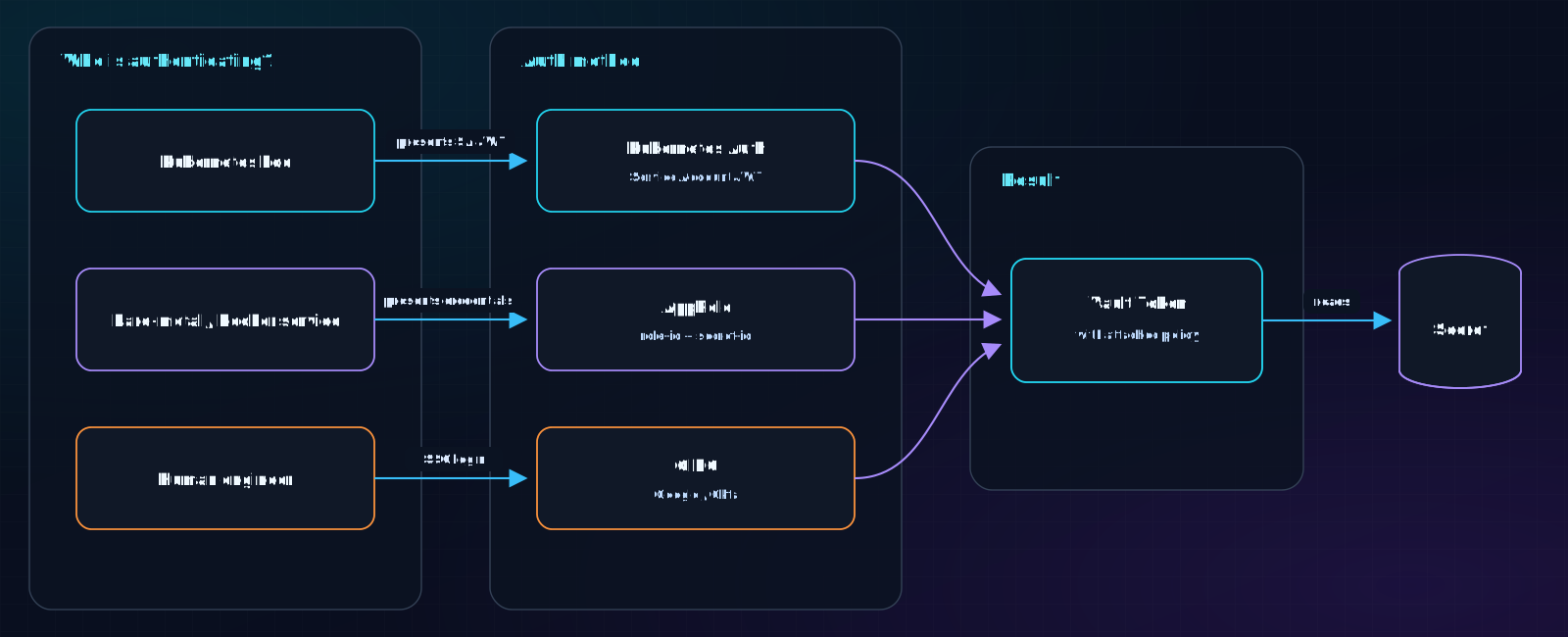
5.1 Kubernetes Auth — For Pods
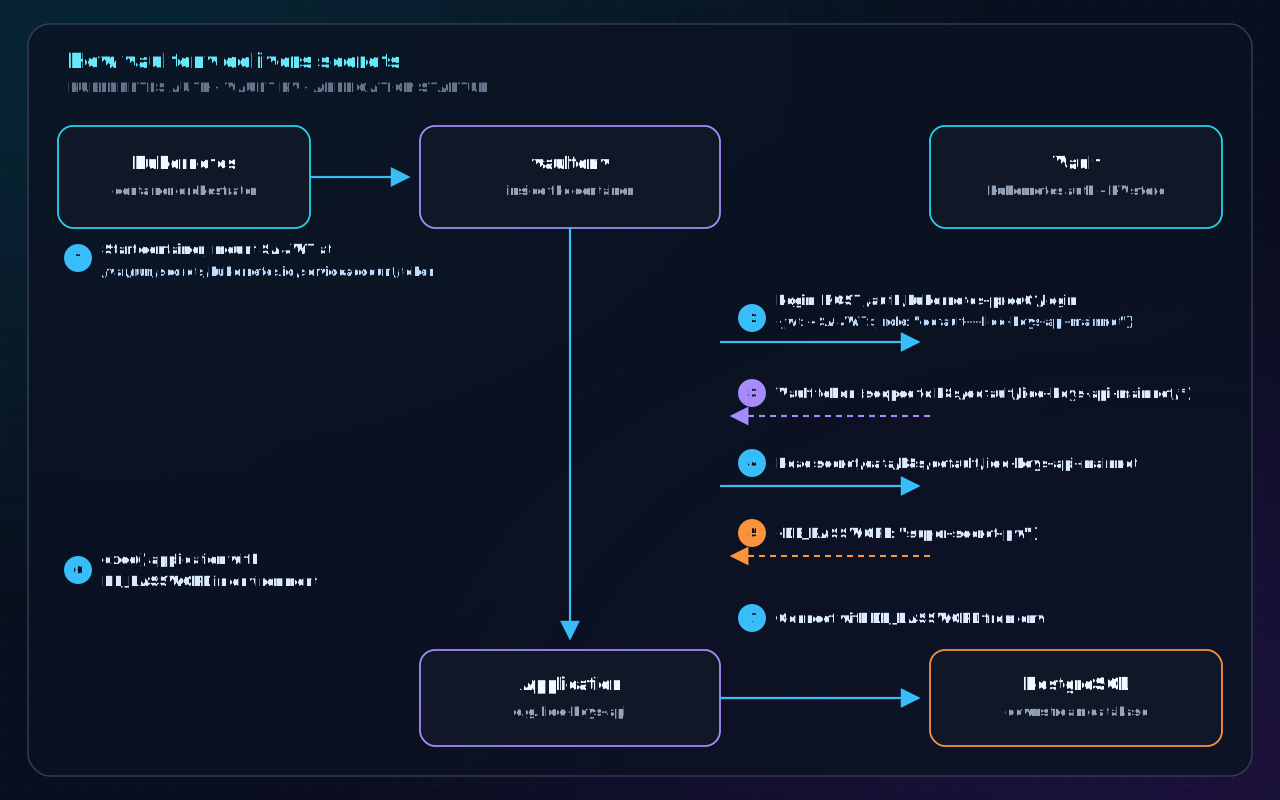
This is the primary method for services running in Kubernetes. Every Kubernetes pod has a Service Account with a JWT token automatically mounted at /var/run/secrets/kubernetes.io/serviceaccount/token.
How it works:
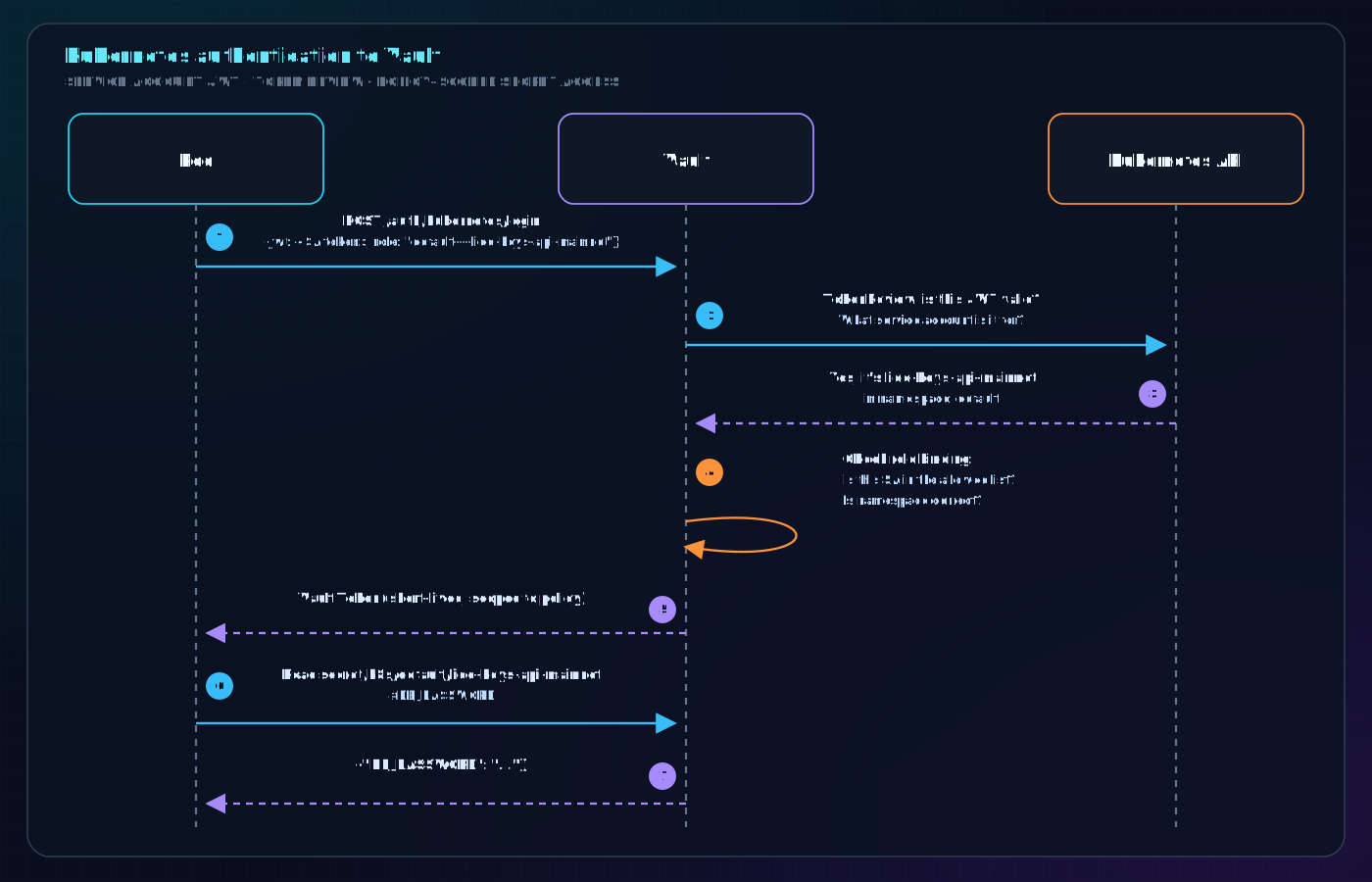
Three Kubernetes auth backends are registered:
| Backend path | Cluster | Used for |
|---|---|---|
kubernetes | Legacy OVH cluster | Older services (argus, pastry, etc.) |
kubernetes-prod01 | k8s-prod01.atlas-pierce.ts.net | Most production EVM services |
kubernetes-ethereum-prod01/02/03 | GKE clusters (europe-west4/3/9) | Ethereum/Gnosis validator pods |
Role naming convention: {namespace}---{service-account-name} (double dashes replace slashes)
Examples:
default---lido-keys-api-mainneteth-mainnet-lido---validator-ejectormonitoring---thanos
Vault registration (Terraform):
# In provision/terraform/modules/vault/k8s_evm.tf
evm_kuberoles = {
  for val in [
    {
      account        = "lido-keys-api-mainnet",
      namespace      = "default",
      extra_policies = [],
    },
    ...
  ]
}
Pod configuration (Kubernetes deployment):
# The pod specifies which Vault role to use
env:
  - name: VAULT_ROLE
    value: "default---lido-keys-api-mainnet"
  - name: KUBERNETES_BACKEND
    value: "kubernetes-prod01"   # which auth backend to use
  - name: VAULT_ADDR
    value: "https://vault-a.ts.chorus1.net"
  - name: VAULT_PORT
    value: "443"
5.2 AppRole — For Bare-Metal and Docker Services
Services running directly on bare-metal hosts (Docker containers on eth-oracle01, validators, etc.) cannot use Kubernetes service account JWTs. They use AppRole authentication instead.
AppRole works like a username/password pair:
role-id— a stable identifier for the service (like a username), not secretsecret-id— a one-time, short-lived credential (like a password), very sensitive
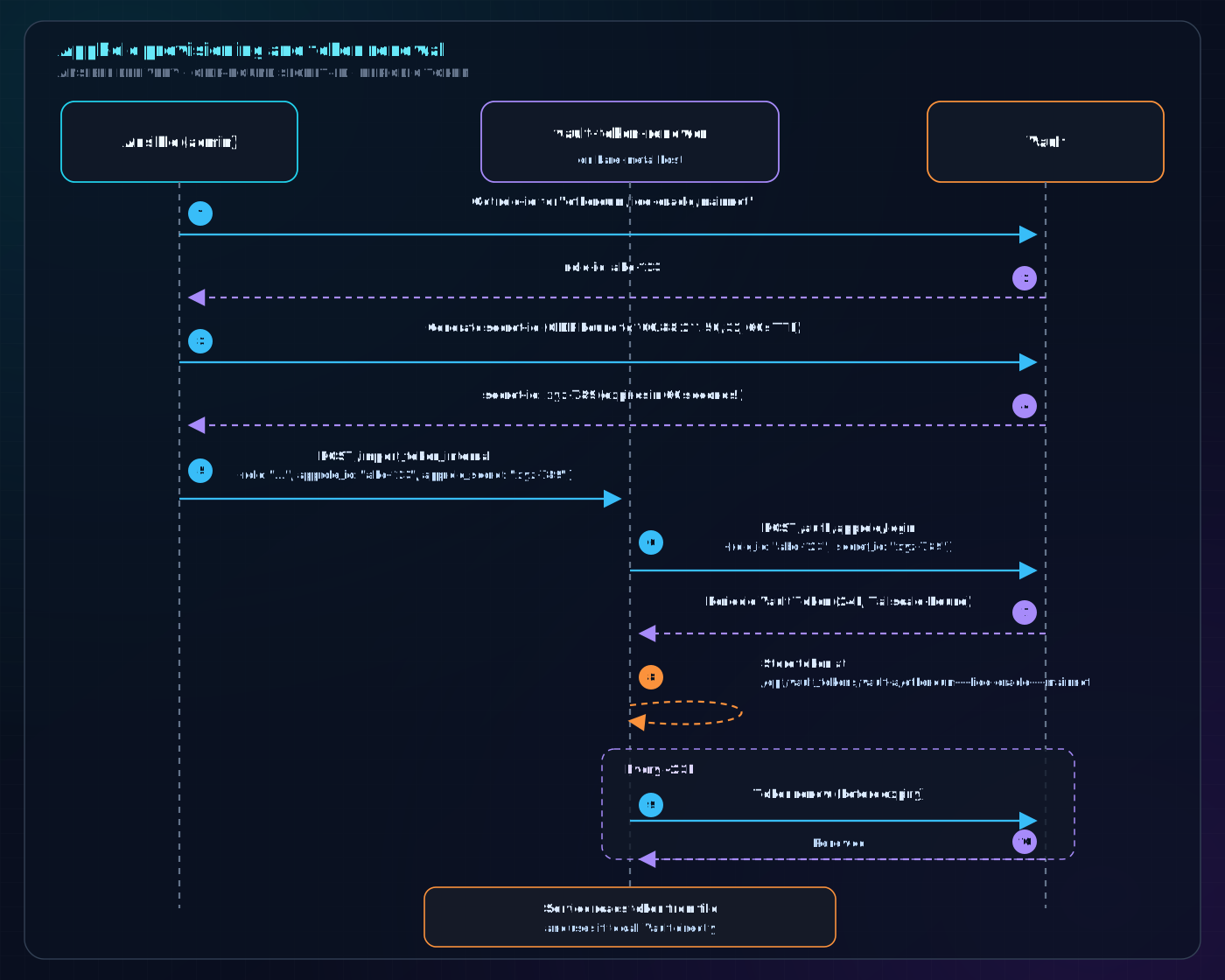
Security properties of AppRole:
secret_id_num_uses = 1: the secret ID is burned after a single login — cannot be reused even if interceptedsecret_id_ttl = "60": secret ID expires in 60 seconds — tight window for Ansible deliverytoken_bound_cidrs = ["100.64.0.0/10"]: the resulting token can only be used from Tailscale IPs- Secret IDs are further bound to the exact Tailscale IP of the target host (
/32)
Naming convention: slashes replaced by ---
- Service path
ethereum/lido-oracle/mainnet→ role nameethereum---lido-oracle---mainnet
Token storage on the host:
/opt/vault_tokens/
└── vault-a/
    ├── ethereum---lido-oracle---mainnet    ← Vault token (read by oracle service)
    ├── ethereum---lido-oracle-v8---mainnet
    └── ...
Services read their token:
VAULT_TOKEN=$(cat /opt/vault_tokens/vault-a/ethereum---lido-oracle---mainnet)
5.3 OIDC — For Human Engineers
Engineers log in via Single Sign-On. Three OIDC providers are configured:
| Provider | Used by |
|---|---|
| GSuite (Google) | Chorus One engineers (@chorus.one) |
| GitHub OAuth | Alternative for some engineers |
| Okta | Bitwise Investment users |
Login command:
export VAULT_ADDR=https://vault-a.ts.chorus1.net
vault login -method=oidc
# Opens browser, prompts Google/Okta SSO login
# Returns a Vault token valid for the session
Engineers get access to:
- Their team's secrets (read-only)
- SSH certificate signing (for server access)
- Admin operations (for designated admins)
6. How Secrets Reach Services
There are two patterns depending on where the service runs.
6.1 vaultenv — The Kubernetes Pattern
vaultenv is a small binary baked into application container images. It acts as the container's entrypoint: it authenticates to Vault, fetches all required secrets, injects them as environment variables, then hands off execution to the real application.
The key insight: the application itself never calls Vault. It just sees environment variables as if they were always there.
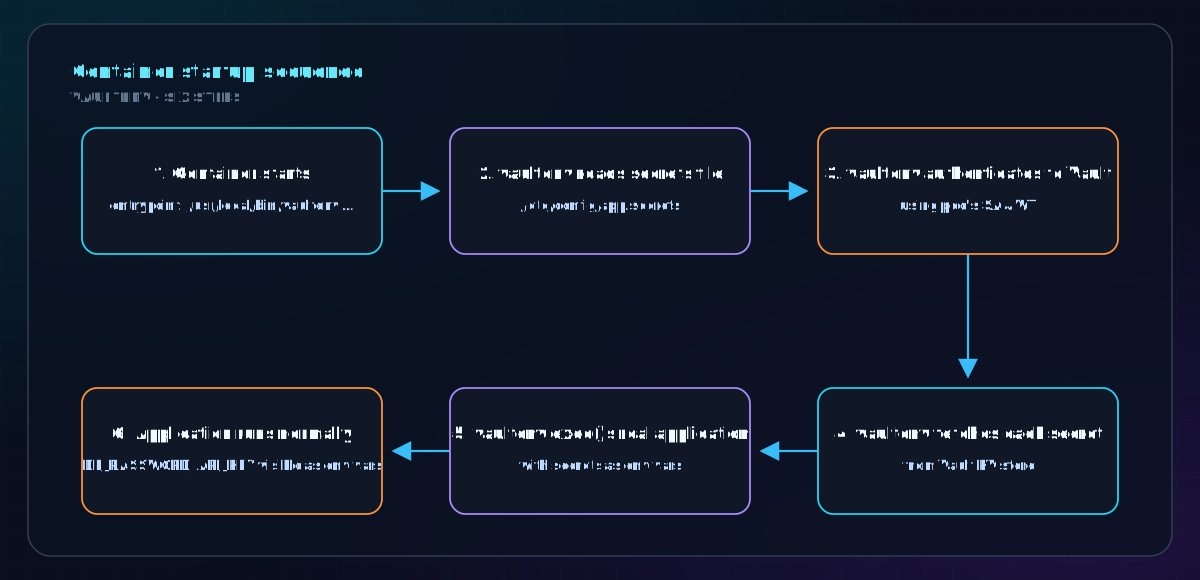
The secrets file format (stored in a ConfigMap — safe to commit, contains paths not values):
VERSION 2
MOUNT secret
DB_PASSWORD=k8s/default/lido-keys-api-mainnet#DB_PASSWORD
API_KEY=k8s/default/lido-keys-api-mainnet#API_KEY
Each line: ENV_VAR_NAME=vault/path/to/secret#FIELD_KEY
Full vaultenv invocation (from a Kubernetes deployment):
# In the Deployment spec
containers:
  - name: lido-keys-api
    command:
      - /usr/local/bin/vaultenv
      - --log-level info
      - --addr https://vault-a.ts.chorus1.net
      - --kubernetes-role default---lido-keys-api-mainnet
      - --auth-backend kubernetes-prod01
      - --secrets-file /etc/config/app.secrets
      - -- /usr/local/bin/lido-keys-api  # ← the real app
    env:
      - name: VAULT_ADDR
        value: "https://vault-a.ts.chorus1.net"
End-to-end flow for a Kubernetes pod:
6.2 vault-token-renewer — The Bare-Metal Pattern
For services running on bare metal or in Docker (not Kubernetes), the vault-token-renewer daemon manages the Vault token lifecycle.
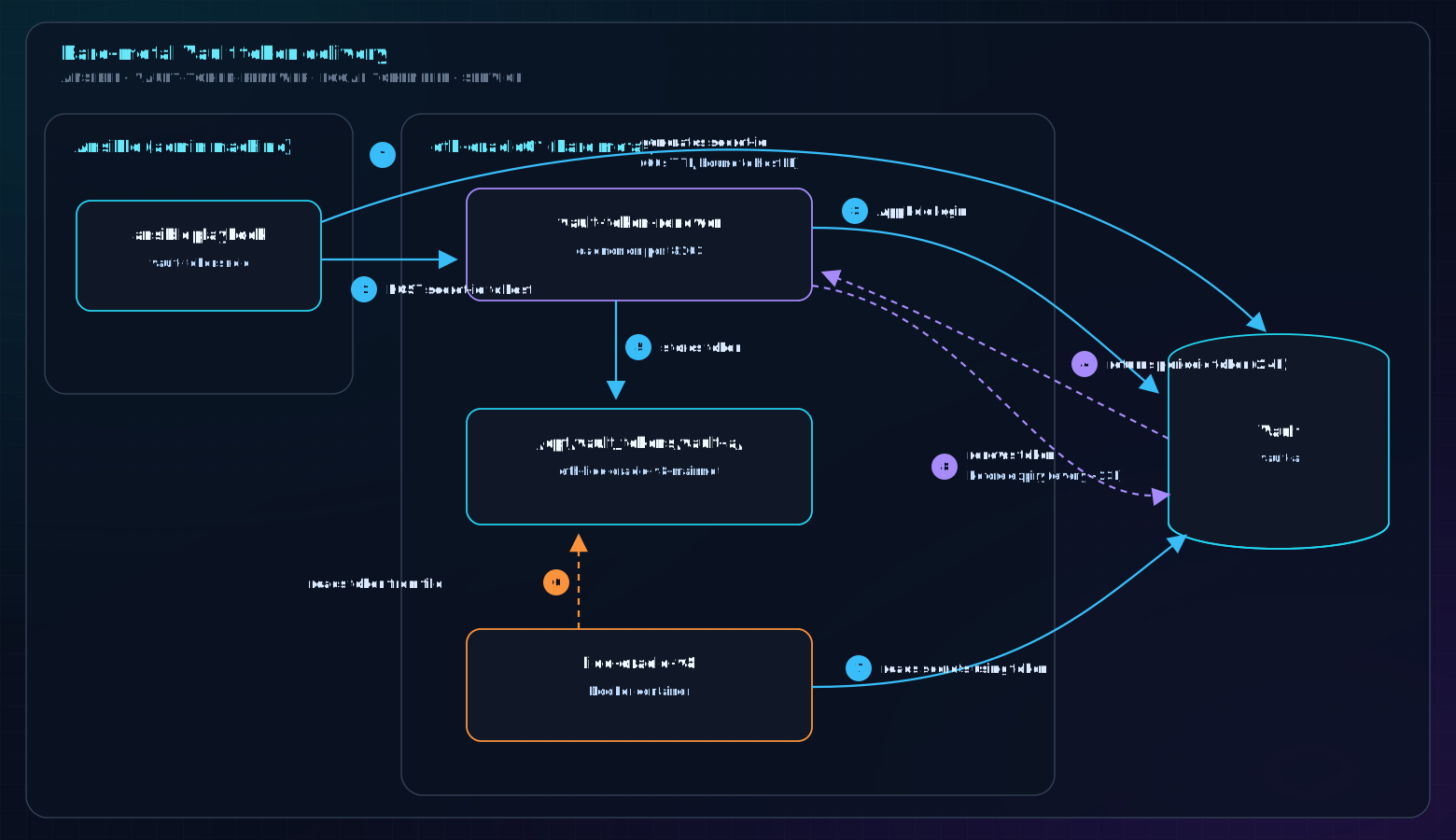
The oracle reads the Vault token from the file and uses it in its env file:
# /dev/shm/vault-secrets/ethereum-lido-oracle-v8/mainnet/env-v8
# (populated by vaultenv or the oracle itself using VAULT_TOKEN)
MEMBER_PRIV_KEY=...
PINATA_JWT=...
FILEBASE_IPFS_TOKEN=...
7. Policy System
How Policies Work
A policy in Vault is a set of rules that defines exactly which secrets a token can access and what operations it can perform. Every token has one or more policies attached. If a path is not explicitly allowed, access is denied.
┌──────────────────────────────────────────────────────────────┐
│                      POLICY EXAMPLE                          │
│                                                              │
│  # Policy: k8s/default/lido-keys-api-mainnet                 │
│                                                              │
│  path "secret/data/k8s/default/lido-keys-api-mainnet/*" {    │
│    capabilities = ["read", "list"]                           │
│  }                                                           │
│  path "secret/metadata/k8s/default/lido-keys-api-mainnet/*" {│
│    capabilities = ["read", "list"]                           │
│  }                                                           │
│                                                              │
│  This token can ONLY read secrets under this exact path.     │
│  It cannot read any other service's secrets.                 │
└──────────────────────────────────────────────────────────────┘
Policy Hierarchy
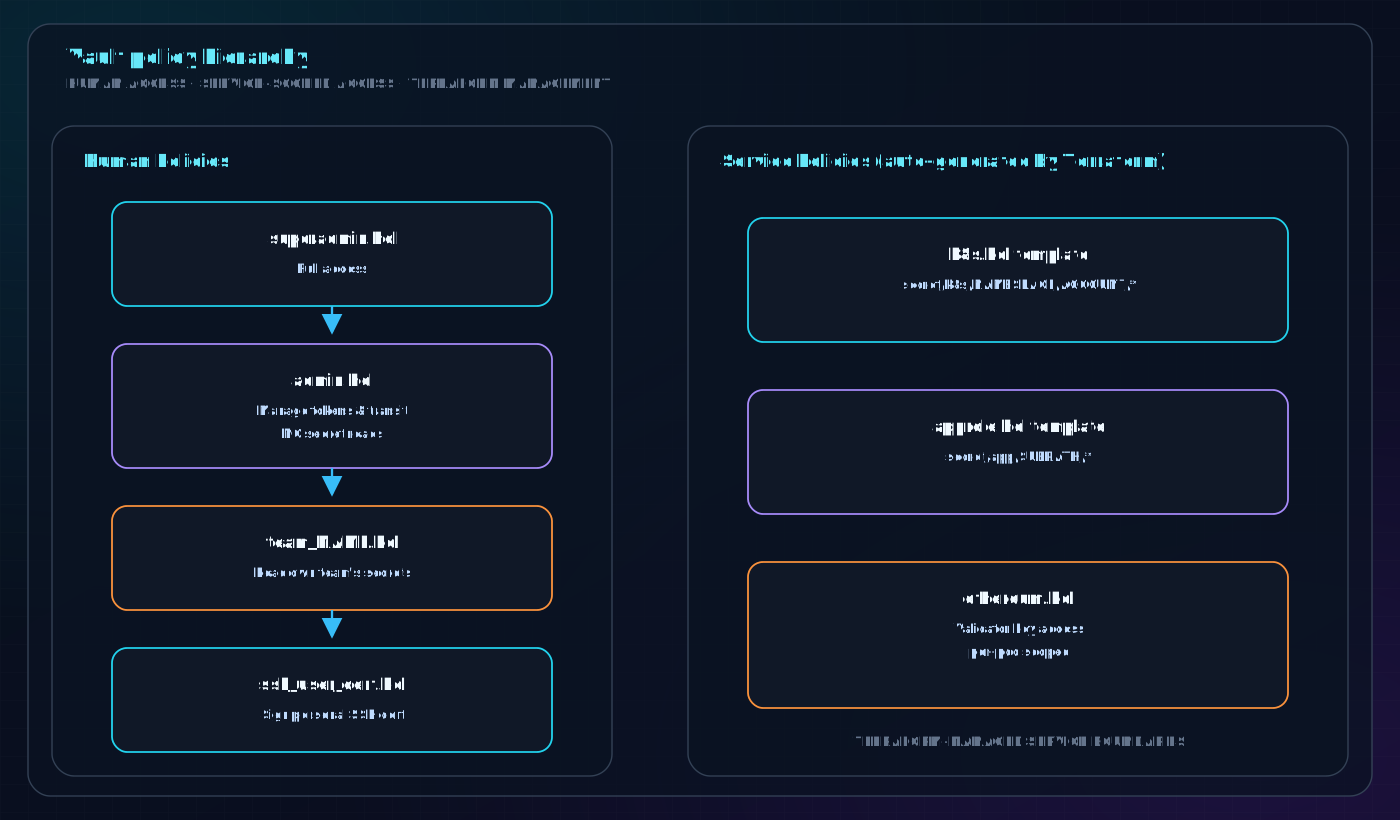
Key Policies
k8s.hcl (Kubernetes services)
Applied to every Kubernetes service account. The template substitutes {NAMESPACE} and {ACCOUNT}:
path "secret/data/k8s/${NAMESPACE}/${ACCOUNT}/*" {
  capabilities = ["read", "list"]
}
approle.hcl (Bare-metal services)
Applied to every AppRole. The template substitutes {SUBPATH}:
path "secret/data/app/${SUBPATH}/*" {
  capabilities = ["read", "list"]
}
ethereum.hcl (Validator pods — the sophisticated one)
This policy uses Vault's identity templating to scope access down to the individual pod level. A vc-validator-0 pod can only read its own keys, not vc-validator-1's keys — a critical slashing protection mechanism:
path "secret/data/app/ethereum/${network}/${tenant}/{{ identity.entity.aliases.${accessor}.metadata.service_account_name }}/*" {
  capabilities = ["read"]
}
At runtime, {{ identity.entity.aliases.${accessor}.metadata.service_account_name }} resolves to the actual pod's service account name (e.g., vc-lido-2), so each pod can only read its own path.
admin.hcl
Admins can manage Vault configuration (create tokens, manage transit keys) but cannot read application secrets. This is intentional: infrastructure admins should not have access to validator signing keys or production credentials.
# Admins can write secrets for others, but NOT read them
path "secret/data/app/*" {
  capabilities = ["create", "update"]  # NO "read"!
}
All Policies are Terraform-Managed
Policies live in provision/terraform/modules/vault/policies/*.hcl and are applied via Terraform. This means:
- All policy changes go through code review (PR process)
- Policy history is in git
- No manual
vault policy writecommands needed
8. SSH Certificate Authority
Instead of distributing static SSH public keys and managing ~/.ssh/authorized_keys on every server, Vault acts as an SSH Certificate Authority (CA). Engineers receive short-lived certificates that automatically expire.
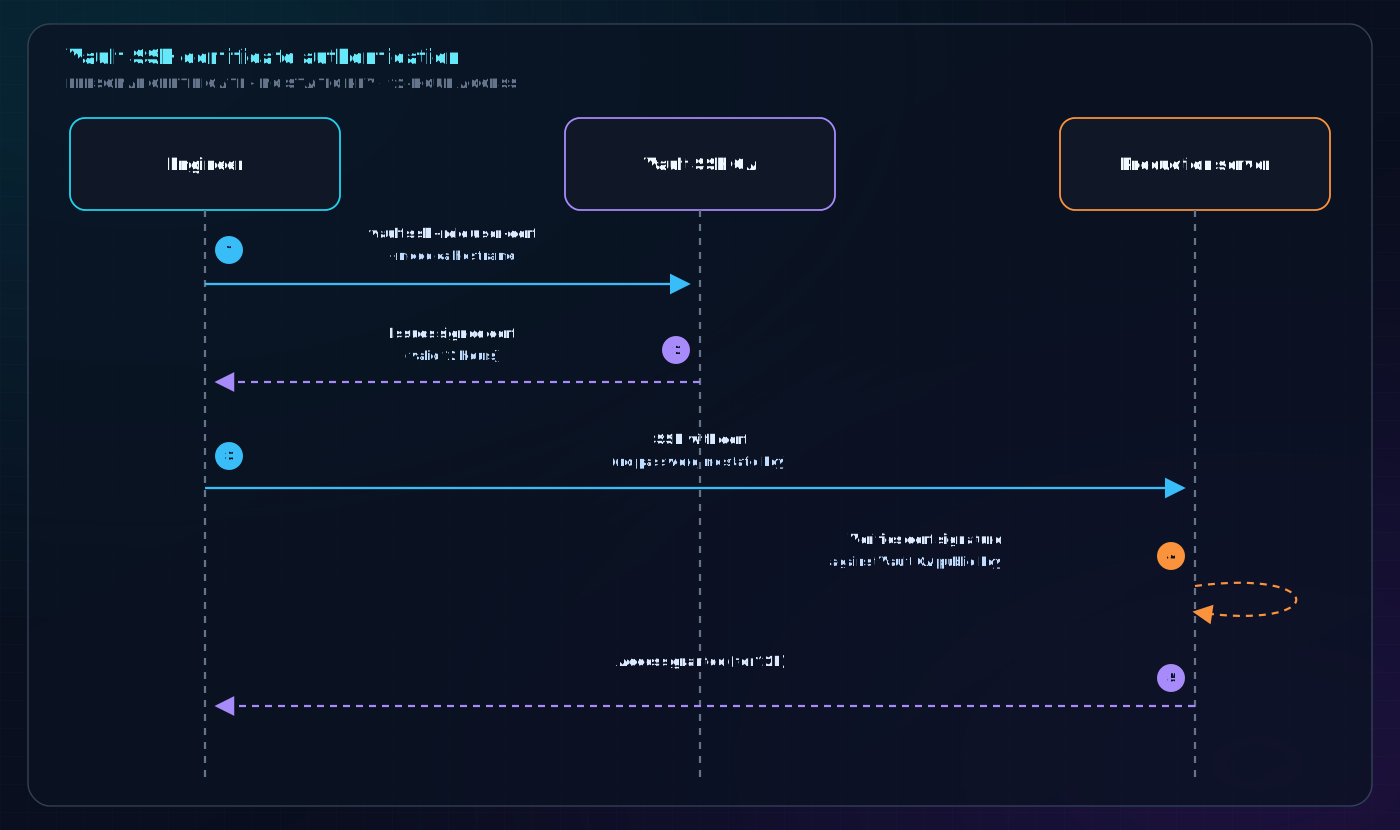
Certificate Roles
| Role | Principal | Max TTL | Purpose |
|---|---|---|---|
user-cert | your username | 18h | Normal daily access |
pe-user-cert | pe | 18h | Protocol Engineering shared user |
superuser-cert | root | 1h | Emergency root access |
{group}-superuser-cert | root@{group} | 1h | Root limited to a server group |
provisioner-superuser-cert | root@provisioner | 2h | Automated provisioning |
host-cert | all domains | ~6 years | Server host certificates |
Why certificates instead of keys?
- Expired certificates cannot be used, even if stolen
- Revocation is instant (update the CA)
- Full audit trail: Vault logs every cert issuance with user identity and serial number
- No need to distribute
authorized_keysto every server
Login to get SSH access:
export VAULT_ADDR=https://vault-a.ts.chorus1.net
vault login -method=oidc          # authenticate to Vault via Google SSO
vault ssh -role user-cert -mode ca eth-oracle01   # issue cert + SSH in one step
9. AWS Secrets Engine
Rather than storing long-lived AWS access keys, Vault generates short-lived STS credentials on demand.
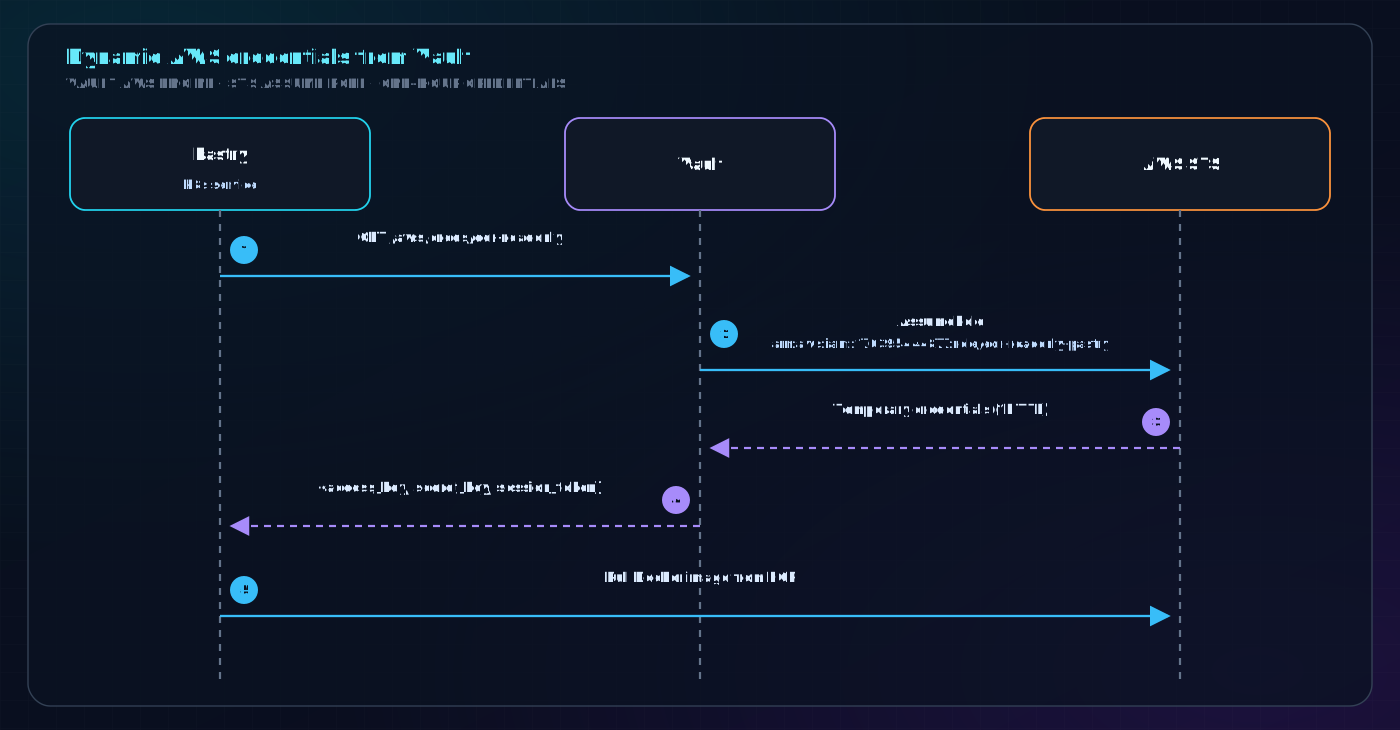
Configured roles:
| Role | AWS IAM Role | Used by |
|---|---|---|
ecr-readonly | ecr-readonly-pastry | Pastry (k8s): pull images from ECR |
s3-influxdb-snapshot-rw | S3 snapshot role | InfluxDB backups |
10. Registering a New Service
10.1 New Kubernetes Service
Step 1: Store the secret in Vault
vault kv put secret/k8s/{namespace}/{service-account-name} \
  MY_SECRET=value1 \
  ANOTHER_SECRET=value2
Step 2: Register the Vault role in Terraform
Add an entry to the appropriate k8s*.tf file in provision/terraform/modules/vault/:
# In k8s_evm.tf (or k8s_prod01.tf etc.)
{
  account        = "my-new-service",   # service account name in k8s
  namespace      = "default",
  extra_policies = [],                  # add extra policies if needed
},
Run terraform apply to create the Vault role and policy.
Step 3: Create the secrets file ConfigMap
apiVersion: v1
kind: ConfigMap
metadata:
  name: my-new-service-secrets
data:
  adapter.secrets: |
    VERSION 2
    MOUNT secret
    MY_SECRET=k8s/default/my-new-service#MY_SECRET
    ANOTHER_SECRET=k8s/default/my-new-service#ANOTHER_SECRET
Step 4: Configure the Deployment to use vaultenv
spec:
  serviceAccountName: my-new-service   # must match Vault role
  containers:
    - name: my-new-service
      command:
        - /usr/local/bin/vaultenv
        - --addr https://vault-a.ts.chorus1.net
        - --kubernetes-role default---my-new-service
        - --auth-backend kubernetes-prod01
        - --secrets-file /etc/config/adapter.secrets
        - -- /usr/local/bin/my-app
      env:
        - name: VAULT_ADDR
          value: "https://vault-a.ts.chorus1.net"
        - name: VAULT_ROLE
          value: "default---my-new-service"
        - name: KUBERNETES_BACKEND
          value: "kubernetes-prod01"
      volumeMounts:
        - name: secrets-config
          mountPath: /etc/config
  volumes:
    - name: secrets-config
      configMap:
        name: my-new-service-secrets
10.2 New Bare-Metal / Docker Service
Step 1: Store the secret in Vault
vault kv put secret/app/my-network/my-service MY_SECRET=value1
Step 2: Register the AppRole in Terraform
In provision/terraform/modules/vault/approle.tf:
resource "vault_approle_auth_backend_role" "my_service" {
  backend        = vault_auth_backend.approle.path
  role_name      = "my-network---my-service"
  token_policies = ["approle/my-network/my-service"]
  ...
}
Step 3: Add to vault-tokens configuration
In provision/ansible/environments/cs/group_vars/all/vault-tokens.yml:
vault_tokens:
  - ansible_group: my_host_group
    name: my-network---my-service
    prefix: ""
    cluster: "vault-a"
    user: myapp
    group: myapp
Step 4: Deploy the token
ansible-playbook --inventory environments/cs playbooks/base.yaml \
  --tags vault-tokens --limit my-host
11. Operational Procedures
Logging In as an Engineer
export VAULT_ADDR=https://vault-a.ts.chorus1.net

# Login via Google SSO (opens browser)
vault login -method=oidc

# Verify your token
vault token lookup
Reading a Secret (as admin)
vault kv get secret/k8s/default/lido-keys-api-mainnet
vault kv get -field=DB_PASSWORD secret/k8s/default/lido-keys-api-mainnet
Writing / Rotating a Secret
# Write (creates or overwrites)
vault kv put secret/k8s/default/lido-keys-api-mainnet \
  DB_PASSWORD="new-password"

# The service will pick up the new value on next restart
# (or on next vaultenv token renewal if dynamic)
Generating an Admin Token for Terraform
cd provision/vault/tools/tf
./with_tfapply.sh   # creates ephemeral 5-min token for terraform apply
Checking Vault Health
vault status
vault operator raft list-peers   # list Raft cluster members
Emergency: Vault is Sealed
If Vault reboots and needs unsealing, two key holders must each run:
export VAULT_ADDR=https://vault-a.ts.chorus1.net
# Decrypt your PGP-encrypted share
echo "wcFMA..." | base64 -D | keybase pgp decrypt
# Provide share
vault operator unseal
12. Real-World Example: KAPI Vault Auth Failure
This incident occurred on July 25–26, 2026 and illustrates what happens when Vault auth configuration is disrupted.
What Happened
The vault role for lido-keys-api-mainnet was migrated between two Terraform formats:
# OLD format (in evm_kuberoles list)
{
  account        = "lido-keys-api-mainnet",
  namespace      = "default",
  extra_policies = [],
},

# NEW format (direct object in separate section)
lido-keys-api-mainnet = {
  service_account_name = "lido-keys-api-mainnet",
  namespace            = "default",
  extra_policies       = [],
}
These two formats register the Vault role against different Kubernetes auth backends — the old format used kubernetes, the new format would use kubernetes-prod01. During the migration/revert cycle, the running pod may have been trying to authenticate via the wrong backend, or the terraform state was left inconsistent.
Lessons Learned
-
Vault auth failures are silent. The pod just crashes — there is no Vault-specific error alert. The alert gap was 23 hours.
-
Always add an
upalert alongside application-level alerts. Both existing KAPI alerts required the pod to be running:# These do NOTHING when the pod is completely absent expr: (time() - process_start_time_seconds{k8s_app="lido-keys-api-mainnet"}) >= 15 * 60 expr: (time() - lido_keys_api_last_update_timestamp{...}) >= 10 * 60The fix was to add:
# This fires within 5 minutes of the pod disappearing expr: absent(up{k8s_app="lido-keys-api-mainnet"}) or up{k8s_app="lido-keys-api-mainnet"} == 0 for: 5m -
Be explicit about
VAULT_ROLEandKUBERNETES_BACKEND. The original deployment relied on defaults. After the incident, these env vars were made explicit in the deployment manifest so the auth path is unambiguous. -
Vault role changes via Terraform are destructive. Moving a role between two Terraform formats deletes and recreates it. The interim state (deleted old role, not yet created new) breaks the service. Use caution and coordinate deploys.
13. Troubleshooting
Service Cannot Authenticate to Vault
Symptoms: Pod crashes on startup, logs show 403 Forbidden or permission denied
Checklist:
# 1. Does the Vault role exist?
vault read auth/kubernetes-prod01/role/default---my-service

# 2. Is the service account name correct? (must match exactly)
kubectl get serviceaccount -n default my-service

# 3. Is the policy attached?
vault policy read k8s/default/my-service

# 4. Does the secret path exist?
vault kv get secret/k8s/default/my-service

# 5. Is the Kubernetes backend configured correctly?
vault auth list
Common mistakes:
- Wrong
--auth-backendvalue (kubernetesvskubernetes-prod01) - Service account name mismatch (case sensitive, must be exact)
- Vault role not registered in Terraform (or Terraform not applied)
- Secret path doesn't match policy path
Secret Not Found
# Check what paths the token can access
vault token lookup  # shows attached policies
vault policy read k8s/default/my-service  # check path rules

# Check the secret exists
vault kv list secret/k8s/default/
vault kv get secret/k8s/default/my-service
Vault Token Expired (Bare Metal)
# On the host, check the token renewer status
systemctl status vault-token-renewer

# Check token validity
VAULT_TOKEN=$(cat /opt/vault_tokens/vault-a/my-service)
VAULT_ADDR=https://vault-a.ts.chorus1.net vault token lookup

# If expired, re-run the vault-tokens ansible playbook
ansible-playbook --inventory environments/cs playbooks/base.yaml \
  --tags vault-tokens --limit eth-oracle01
Vault Itself is Down / Sealed
# Check status
vault status

# If sealed, two key holders must unseal
vault operator unseal

# Check Raft peers
vault operator raft list-peers
Quick Reference
| Task | Command |
|---|---|
| Login | vault login -method=oidc |
| Read a secret | vault kv get secret/k8s/default/my-service |
| Write a secret | vault kv put secret/k8s/default/my-service KEY=value |
| List secrets | vault kv list secret/k8s/default/ |
| Check token | vault token lookup |
| SSH to server | vault ssh -role user-cert -mode ca hostname |
| Check Vault health | vault status |
| Check Raft peers | vault operator raft list-peers |
| List auth backends | vault auth list |
| List policies | vault policy list |
| Read a policy | vault policy read k8s/default/my-service |
| List Kubernetes roles | vault list auth/kubernetes-prod01/role |
Last updated: July 2026 — based on provision/terraform/modules/vault/ and provision/ansible/roles/chorusone.vault/